


Quincy - Quinceanera Planner
4.736.00 Reviews
App Specs
- Version
- 1.7.3
- Updated On
- License
- Free
- Downloads
- 100,000+
- Developer
- Events Apps
- Categories
- Events
- Platform
- Android, iOS
Screenshots

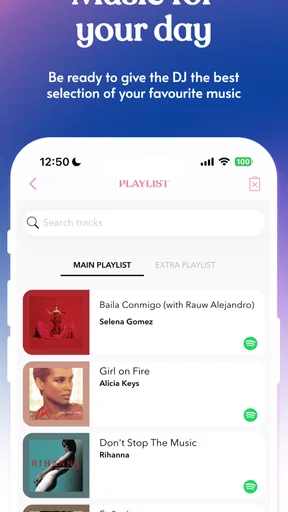

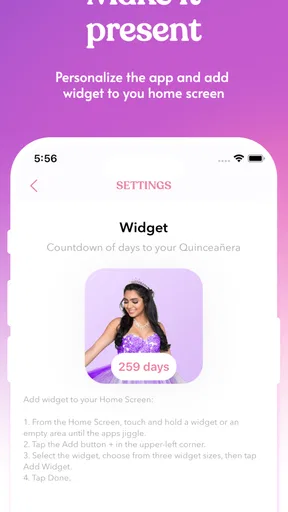
 Analysis by AppCompare
When the excitement of choosing a dress and imagining the party gives way to calls, decisions, and details, a quinceañera plan can quickly become scattered. I like the idea of keeping the practical work close to the celebration itself: a checklist, guest planning, and dress ideas all belong in the same conversation. Quincy - Quinceanera Planner is aimed squarely at that job, so it makes more sense for a family organizing a 15th-birthday celebration than a general-purpose calendar or a broad event app.
A useful first week, if you give it a real job
The first days with a planning app are often the easiest: everything feels new, and adding ideas is more enjoyable than chasing down replies. Quincy’s appeal is that it is specifically for quinceañera planning, rather than asking you to translate a wedding checklist or a generic party template into your own event. Its store summary points to checklists, guest planning, and quince dresses, which are the kinds of decisions that can otherwise end up in separate notes and family chats.
I would begin by treating the checklist as a shared map of what still needs attention, not as a promise that every task is covered. Set aside a short planning session with the people who are actually making decisions, then sort the immediate priorities from ideas that can wait. That small habit can keep early enthusiasm from turning into a long, unranked wish list. A dress search, for example, is more useful when you note what needs deciding than when you save attractive options without a next step.
The app is free to download, with in-app purchases ranging from $0.99 to $7.99 per item. I would try the free experience against your actual planning needs before paying for anything: first see whether the basic organization fits the way your family works, then decide if an extra item solves a problem you genuinely have. It is rated for Everyone, though the person coordinating the event may well be a parent or another adult alongside the guest of honor.
Does it stay useful after the initial excitement?
Quinceañera planning stretches across changing priorities. Early on, you may be comparing dresses or deciding what kind of gathering you want; later, the guest count and outstanding decisions become more pressing. A dedicated planner can keep those threads visible, but its lasting value depends less on how many ideas you collect and more on whether you revisit the plan after each real-world decision.
For a month-to-month routine, I would use one brief check-in to review what has changed, what is waiting on someone else, and what must be decided next. That is more sustainable than opening the app only when stress spikes. It also makes the checklist useful as a handoff: if a relative is helping with one part of the celebration, you can discuss the task rather than retelling the entire planning story.
There is a trade-off to a dedicated tool. It can keep quinceañera-related planning from disappearing among school reminders and everyday errands, but it cannot make relatives respond or settle a disagreement about the event. If several people are coordinating, agree on who updates the plan and where final decisions are recorded. Otherwise, even a well-organized app can become one more version of the truth.
Worth Reading Before You Choose

EA SPORTS FC Mobile 26 Is a Bigger Football Game, but It Takes Time

Flipboard Shows What News Apps Must Do Beyond the Feed

Switching to Android Auto Means Rethinking Your Driving Routine

Google Calendar Makes a Crowded Week Easier to Manage

Ludo King Makes the Most of the Minutes Between Plans

Baby Panda World Brings Quick Play to Modern Phones, but Its Game Library Feels Busy
Where planning apps can create extra work
The main risk is over-organizing. A checklist is meant to reduce mental clutter, but repeatedly copying the same task into a calendar, a family chat, and an app creates more maintenance than clarity. I would keep Quincy as the home for quinceañera tasks and use other tools only where they do a specific job better. For instance, a regular calendar may still be the clearest place for appointments everyone already checks.
Another point to watch is the boundary between planning and communication. A guest list can help you think through invitations and responses, but families may still need a familiar way to contact guests or settle last-minute changes. Before entering personal details, decide who needs access and what information belongs in the tool at all. Keeping the list focused on what helps planning is a sensible way to avoid unnecessary duplication.
For a quick sense of scale, Quincy has a 4.7 average from around 770 ratings and has passed 100,000 installs. It is made by Events Apps, and version 1.7.3 is listed for devices running Android 9 or later. Those details make it a recognizable, actively chosen niche option, but they do not tell me whether its workflow will suit every family; the best test is whether you can keep your own decisions clear in it.
I would be cautious about expecting a planning app to replace a hired coordinator, a detailed spreadsheet, or direct conversations with family. Those alternatives can be better when the event has many vendors, complex logistics, or several people who need precise shared records. Quincy is most compelling when the goal is to make the quinceañera’s own planning easier to follow, especially if a general notes app feels too open-ended.
A realistic use case is a family that has agreed to celebrate but is still working out what to do next. One evening, the guest of honor can review dress ideas while a parent checks the planning list; they can choose one decision to make that week and leave less urgent ideas for later. The next time they sit down together, the conversation can start with what changed instead of trying to reconstruct it from scattered messages. That routine is modest, but it is the kind of recurring value that gives a planner a reason to remain installed.
Getting Started with Quincy
First things first, downloading Quincy - Quinceanera Planner is a breeze. Available on both Android and iOS, you can find it on the Play Store and App Store respectively. Once installed, the app greets you with a vibrant and user-friendly interface. You don’t need to be a tech whiz to navigate through it, which is a huge relief for those of us who get a little overwhelmed with too many buttons and options.
After a quick sign-up, you're prompted to enter your event date. Quincy then starts working its magic by generating a timeline and checklist tailored specifically for your quinceañera. Talk about a personal assistant in your pocket!
Features That Make Life Easier
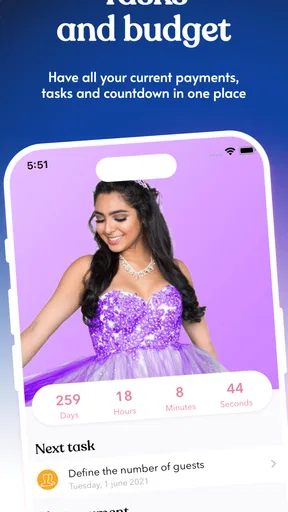
One of the standout features of Quincy is its comprehensive budget tracker. Let's face it, quinceañeras can get expensive, and it’s easy to lose track of spending. Quincy helps you set a budget and stick to it by breaking down expenses into categories like venue, catering, and decorations. You can even upload receipts and set alerts for payment deadlines. Pretty neat, right?
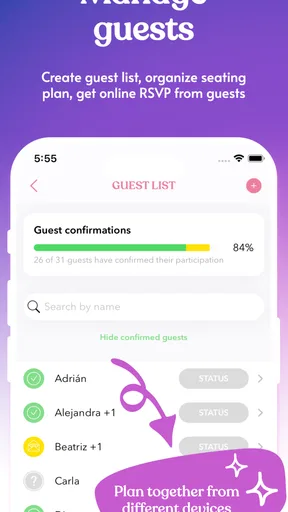
Another fantastic feature is the guest list manager. You can import contacts directly from your phone, so there's no need to manually input each name. Quincy lets you keep track of RSVPs, meal preferences, and even seat assignments. I found this particularly helpful because, let’s be honest, organizing a seating chart can be a logistical nightmare.
Personalizing Your Quinceañera
Quincy also allows for a high degree of personalization, which is essential for making your quinceañera truly yours. From choosing color themes to creating a playlist, the app provides tools to make every aspect of your celebration reflect your personality. You can even share your theme and decor ideas with your planner or family directly through the app.
For those inclined towards a more digital approach, Quincy offers a delightful feature to design and send out digital invitations. This not only saves paper but also makes tracking RSVPs much more manageable. Plus, you can customize your invitations with various templates and themes.
Staying on Track
One feature I found particularly useful is the event timeline. Quincy breaks down the planning process into manageable chunks, providing reminders and tips along the way. Whether it’s reminding you to book your DJ or schedule dress fittings, you’ll always know what’s next on the agenda.
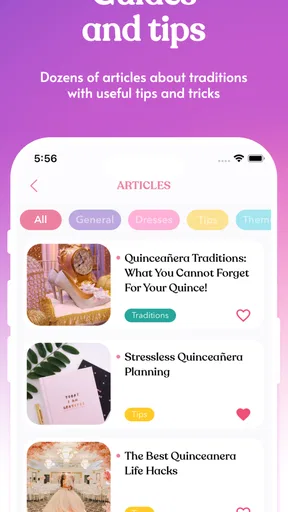
The app also includes a section for notes and ideas, which acts like a digital scrapbook. Here, you can jot down random thoughts, save links to inspiration, or even upload photos of potential dress designs or cake styles. It’s like having a Pinterest board specifically for your quinceañera, right at your fingertips.
Keeping the plan practical as details change
One helpful way to use a guest list is to make it a working draft rather than treating the first count as final. Families often need to talk through who is invited before sending anything, so separate “still deciding” from “ready to contact” in whatever way the app allows, and revisit that distinction before invitations go out. This reduces the chance that an early estimate gets mistaken for a settled number.
The same principle applies to spending. A budget is most useful when it reflects commitments as well as hopes: record a choice once it is agreed, and distinguish it from an idea that is still being compared. If you are weighing several dress or decor options, a short note about why one is preferred can save a repeat discussion later. The practical benefit is not just remembering a number; it is remembering the decision behind it.
For families who prefer paper, Quincy does not have to replace every conversation or printed note. I would use it to hold the current plan, then bring a printed summary or handwritten list to a meeting if that is what relatives find easiest. The key is to avoid maintaining two complete plans. A single source for current decisions, with other formats used only for sharing or discussion, keeps the app from becoming an administrative chore.
Who will get the most from it?
This is a natural fit for the guest of honor who wants a visible role in the preparations, and for a parent or relative who is coordinating many small choices. It can also suit a family that has no professional planner and wants a quinceañera-focused place to gather tasks rather than building a system from scratch. The free starting point makes it reasonable to explore before deciding whether its approach matches your household.
I would skip it if your event is already being managed through a coordinator’s established process, or if every decision is handled comfortably in a shared calendar and a simple guest spreadsheet. Adding another place to check is not automatically an improvement. It may also be a poor fit for a family that does not want to organize planning digitally or that needs every participant to work in one shared system but cannot agree on who will maintain it.
A common question is whether it can handle every part of the celebration. The useful expectation is narrower: it is a planning companion for the quinceañera, not a substitute for vendor agreements, family conversations, or careful confirmation of arrangements. For anything with a deadline or financial commitment, I would still verify the details directly with the people involved rather than relying on a reminder alone.
Another question is whether to start early or wait until the date is fixed. If you are still exploring, you can use a checklist and collect ideas without treating every item as urgent; once the event date is settled, a timeline becomes more actionable. If the date changes, review the plan rather than assuming the old sequence still makes sense. That quick reset helps avoid following a schedule that no longer fits.
People also wonder whether a dedicated app is better than a notes app. For quinceañera planning, the advantage is having the event’s tasks and related ideas in a focused context; the disadvantage is learning and maintaining another tool. A notes app is more flexible, while a spreadsheet can be easier for detailed comparisons. I would choose Quincy when its event-specific structure saves more effort than it takes to keep current.
Final Thoughts
All in all, Quincy - Quinceanera Planner is a game-changer for anyone planning a quinceañera. It offers a combination of practicality, ease of use, and personalization that is hard to find in other planning apps. Whether you're doing it all yourself or working with a planner, Quincy provides great support every step of the way.
If you’re on the hunt for a reliable planning companion that can keep up with the demands of organizing such a special occasion, Quincy is definitely worth checking out. It’s like having a wedding planner in your pocket, but without the hefty price tag. So go ahead, give it a try, and let Quincy help you create a quinceañera to remember!
Whether it earns a lasting place
My longer-term verdict is that Quincy is worth keeping while it is actively helping the family make decisions, not simply because a planning app feels like something every event needs. Its value is strongest when you return to it at each planning checkpoint and use it to settle one or two concrete questions. Once the celebration is over, its job is naturally finished; during the months before it, the right routine can make it a useful home for the event rather than another icon you forget to open.
I would start with the free version, keep the plan deliberately lean, and check whether it reduces the back-and-forth in your household. If it does, continue using it; if it creates duplicate work, move the relevant details to the calendar or spreadsheet your family already trusts. For a quinceañera-specific organizer, that is the fairest test: not whether it can hold every idea, but whether it makes the next decision easier without demanding too much attention in return.
Pros
- User-friendly interface for easy planning.
- Customizable event templates available.
- Budget tracking feature is very detailed.
- Guest list management is seamless.
- Reminders for important tasks are helpful.
Cons
- Limited theme options for invitations.
- Free version has ads
- can be distracting.
- Occasional sync issues with calendar.
- No offline mode for planning tasks.
- Premium features are quite pricey.
FAQs for Quincy - Quinceanera Planner
What is Quincy - Quinceañera Planner?
Quincy - Quinceañera Planner is a comprehensive app designed to help you plan and organize a perfect Quinceañera celebration. It offers features such as guest list management, budget tracking, and vendor coordination, making it easier to manage every detail of this special event.
Is Quincy - Quinceañera Planner free to use?
The basic version of Quincy - Quinceañera Planner is available for free, offering essential planning tools. However, there are premium features that can be unlocked through in-app purchases, which provide enhanced functionalities like detailed budget analysis and additional customization options.
Can I customize the planning templates in the app?
Yes, Quincy - Quinceañera Planner allows you to customize planning templates to fit your unique needs. You can modify elements such as the theme, color schemes, and specific event details to ensure that your Quinceañera reflects your personal style and preferences.
Does Quincy help with vendor recommendations?
The app includes a feature for vendor recommendations where you can find and contact local vendors for catering, decoration, and entertainment. It also provides user reviews and ratings, helping you make informed decisions about which vendors to choose for your event.
Is it possible to sync my planning progress across devices?
Yes, Quincy - Quinceañera Planner supports syncing across multiple devices. By creating an account, you can access your planning progress from any device, ensuring that you have all your information on hand whether you're using a smartphone, tablet, or computer.


